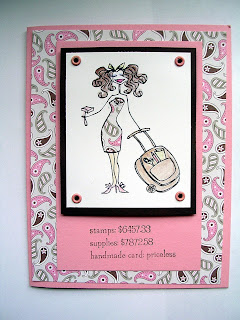
Today I thought I would share another Bella and an organization tip for keeping your own electronic stamping notebook.
First, the Bella. Today I have stamping bella to show you. I paper pieced her dress using Stamping Up! D.P. I just love the sentiment - which is also from Stamping Bella. It says "Stamps $6457.33 Supplies $7872.58 handmade card: priceless" How true is that!
Details:
Stamps: Stamping Bella Paper: Stampin Up! Chocolate Chip, Pretty in Pink and D.P. Ink: Palette Noir black Technique: Paper Piecing and Gamasol and Colored Pencils Misc: Pretty in Pink Brads (Stampin Up!)
Now, my little tip for organizing all your stamping ideas from blogs. I know that I find so many great ideas on blogs and I thought it would be great to be able to save them and categorize them in a way that I could easily find what I was looking for.
What works best for me is to use Microsoft OneNote 2007 to create an online library of all my favorite cards and ideas. In case you have never used OneNote it is basically nothing more than an electronic notebook. You can create different notebooks and then create groupings under each notebook.
What I did was create a Stamping notebook and then I created categories (called section groups in OneNote) under that for each of my favorite stamp vendors - so I have a category (section group) for Stamping Bella, MFT, Cornish Heritage Farms, Stampin Up!, etc. I even have a category for Tutorials, Gift Ideas - you can add whatever you want. Then I created a sub-category (called a section) under each of these for specific sets or stamps. For example, under Stamping Bella I have a section for CosmoBella. Then, you can just copy and paste or use the "
Send to OneNote" command to file the card using that particular stamp in the appropriate location. You don't need to create all your categories and sections at once - I just create them as needed when I want to add to my notebook.
The advantage is that I have all my ideas in one place and I when I paste them into OneNote it keeps all the links to the original post so I can see exactly where I got my idea - and I can give the individual credit for their work. No longer do I need to sit and think - "Where did I see that tutorial on the 2-4-6-8 box?". Also, I can save the entire notebook to a PDF document if I want to take it to another computer that doesn't have OneNote on it.
One thing to keep in mind - you will find an option on your browser to "
Send to One Note" - in IE7 this is located under
Tools - Send to OneNote. This option will send the entire web page to OneNote and file it under the "Unfiled Notes" section. Then, you will need to go in and move it to the proper location. To get around this, I just highlight the portion of the web page that I want to copy (I typically avoid copying the blog rolls and archive sections on the page) and then just hold down the
CTRL + C on the keyboard to copy the highlighted contents. Then, I navigate to OneNote and either go to the location where I want to paste the contents (may need to create the appropriate section group or section) and either use
CTRL + V on the keyboard or use the menu in OneNote to
Edit - Paste the contents.
I have only used the 2007 version of OneNote so I can't speak to the 2003 version. It is my understanding that the 2007 version is much nicer to use. Also, I use Google reader to subscribe to all my blogs so that I don't need to visit each blog or rely on an email messge to tell me when they have been updated. Google reader is free - you just need to create an account to use it. I just add my subscriptions in Google reader and I log in and it tells me what blogs have been updated with all the links right there for me. I believe there are similar products that do this as well.
I hope you find this tip useful. I know it really works for me - but I am somewhat of an organization "freak". Feel free to contact me if you have any questions.

 Details:
 Today I thought I would share another Bella and an organization tip for keeping your own electronic stamping notebook.


